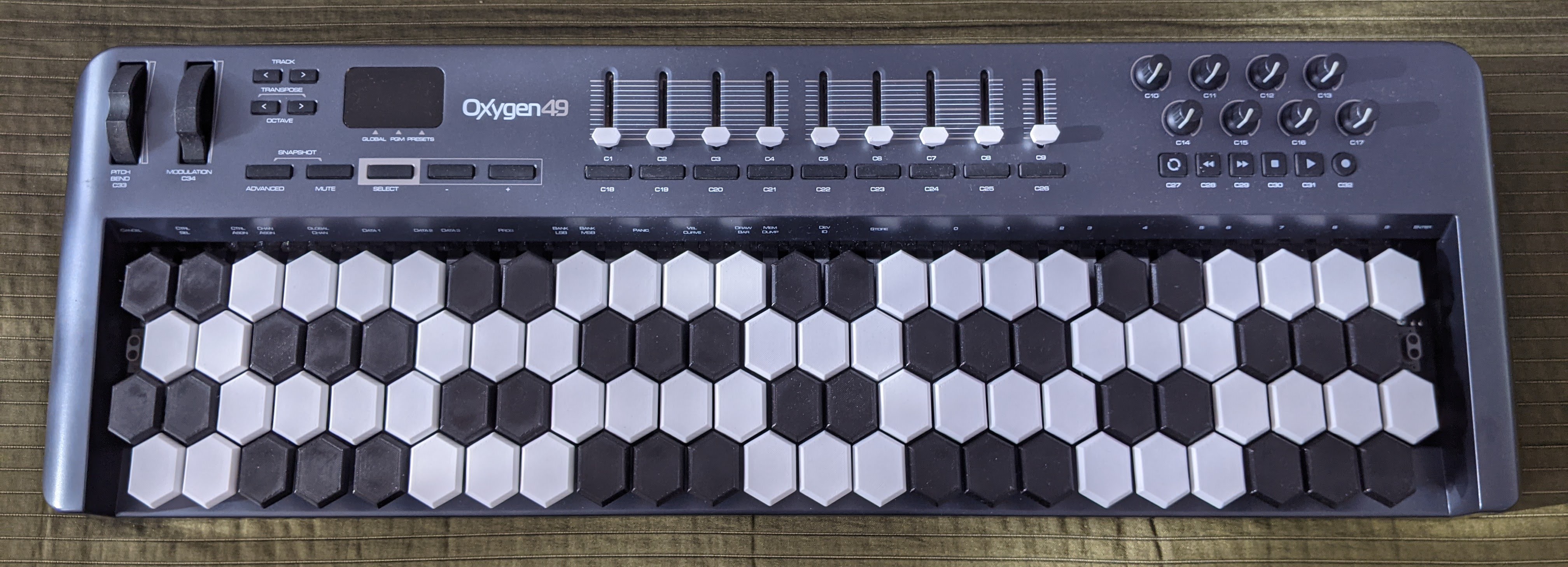
Isomorphic keyboards are musical instruments with unique key layouts. Through their thoughtful design any given sequence and combination of musical intervals, in essence scales and chords translate to the same shape on the keyboard, regardless of their root note. This property provides a more intuitive mental model for understanding and learning the intricacies of music theory. Exercising scales and chords in different roots becomes obsolete, since transposing does not involve learning new movements. Isomorphic keyboards ditch the legacy created by decisions taken across many centuries and present to us a clean slate: a medium where exploring new ideas is not constrained by history.
Retrofitting a traditional keyboard with an isomorphic layout constraints the options of alternative designs we can choose from. The least intrusive adaptation I could come up with only involved swapping out the keys to custom ones. The design borrows its layout from the Jankó keyboard, but reduces the number of rows to four, accommodating the limited vertical space available on the original instrument. Horizontal distance between keys remains the same as on a traditional keyboard, facilitating skill transfer. The motivation for hexagonal shapes as buttons is mostly aesthetic, but by having larger area than circles, they are also easier to hit. The components were designed entirely in Fusion 360.
The components were 3D printed on a Prusa i3 MK3 printer
without any support material. The braces were printed
upside down with PETG, the material's flexibility
helps the keys to settle more easily in their places and its
smoothness reduces friction when the keys are pressed. The
keys were printed on their sides with PLA, the
material's sturdiness keeps the components from blending
when force is applied. I would highly recommend adhering to
the previous instruction, using PETG renders the keys too
flimsy to use. The buttons were printed upright with
PETG. Since this material is silkier, it is more
pleasant to touch. This is the most exposed part of the
design, PETG also tends to resist ultraviolet light better.
Like the buttons, the sliders were also printed
upright with PETG for similar reasons.
For one octave you will need 1 brace, 6
long keys, 6 short keys, 14
white buttons, 10 black buttons.
The modification was designed for the M-Audio Oxygen MK III MIDI controller with any number of keys. In order to install the new keys, the old ones have to be removed entirely. Replacing the keys is possible after disassembling the keyboard by loosening the screws on its bottom. The old keys consist of three injection molded parts per octave, they can be removed by loosening the screws. The components have to be assembled into sections spanning one octave. The keys should be inserted into their slots in the brace and held in place by a steel wire with a diameter of 1.1mm. The buttons should snap on the keys when pressed. When placing the assembled parts in their places the hooks on the bottom of the keys should be under the dampener strip on the keyboard. Fasten the sections with screws, but use smaller ones or print additional spacers on top of all the screw holes on the braces. Otherwise the screws will poke holes on the bottom of the keyboard, since the original keys had a higher base then the brace. Screw the bottom of the keyboard back.
Engineering my way out of tedious piano practice did not play out as I planned: learning the new layout is serious effort. While dexterity acquired during piano practice certainly helps a lot, old muscle memories unfortunately do not translate as well. I have always played piano just for fun without any serious intent, so I do not feel the urge of going back to the original layout. I prefer exploring the unfolding patterns on the new layout more than gaining some comfort in my fading piano playing ability. All this being said, if you decide to build this device and you will threat it as a new, unknown instrument, you will probably have some joyful moments playing it.